Strategy
Brand Systems for B2B: How to Build a Brand That Scales
A brand system turns positioning, voice and visual identity into rules, templates, a shared library and an owner, so a growing B2B team ships on-brand work without a bottleneck.
Key takeaways
- A brand system combines a strategy core, verbal and visual systems, rules and templates, an asset library and governance, so many people can produce on-brand work without a designer.
- Visual identity, brand guidelines and a product design system are parts of a brand system, not substitutes for it.
- Build from the inside out: audit, strategy core, verbal system, visual system, templates and library, then rollout with governance.
- Templates and the asset library are where a brand scales: lock the frame, free the content, and build for the formats teams repeat.
- Governance is a loop with one owner, self-serve by default, logged exceptions and scheduled updates.
A brand system is the set of strategy, verbal rules, visual rules, templates, shared assets and governance that lets many people produce consistent brand work without asking a designer every time. Guidelines describe a brand; a system lets a whole team use it.
In technical B2B, the need shows up at the same point again and again: the commercial team grows, sales starts building its own decks, product marketing ships launch pages on a deadline, and the brand starts to look like five different businesses. At Sutro, building the brand system is the third step of our approach, after diagnosing the commercial inflection and defining the narrative. That order is deliberate, and it is why the brand systems we build for B2B tech companies start from positioning instead of a logo file.
I started Sutro after years as CEO of Ramotion, which has been designing brands and products since 2009 across more than 350 projects. This guide covers what a brand system contains, how it differs from guidelines and a design system, how I build one in six steps, an illustrative worked example, and how to govern it once it is live.
What a brand system includes
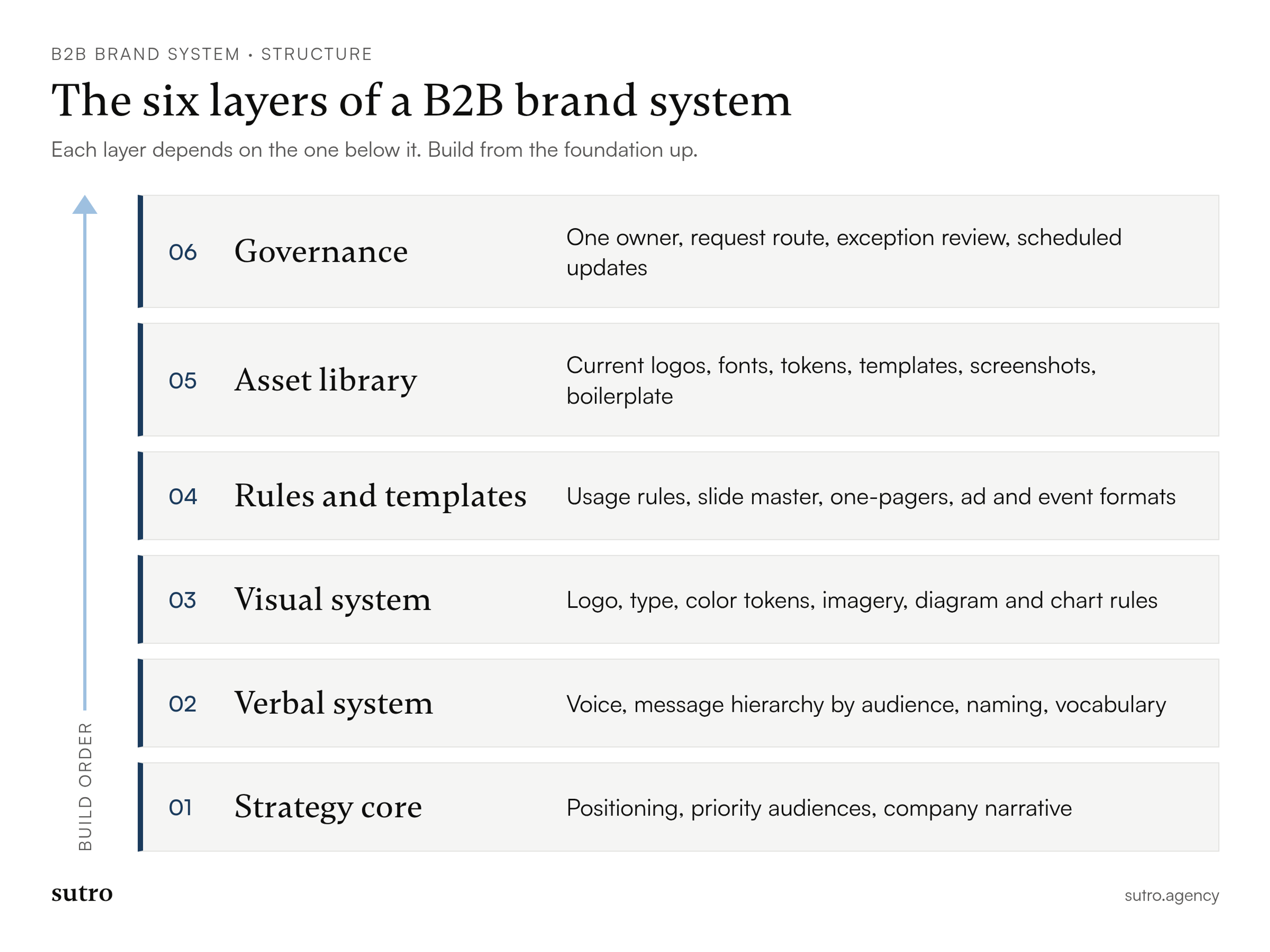
A brand system includes six layers: a strategy core, a verbal system, a visual system, rules and templates, an asset library, and governance. Each layer depends on the one inside it, which is why the order of the build matters more than the polish of any single file.
- Strategy core: positioning, the audiences that matter, and the company narrative. Every later decision is checked against it.
- Verbal system: voice, message hierarchy, naming conventions and the vocabulary you use or avoid.
- Visual system: logo, type, color, imagery, iconography and, for technical products, diagram and chart rules.
- Rules and templates: how the elements combine on real formats, plus ready-made files for the formats people repeat.
- Asset library: one current home for logos, fonts, templates, product screenshots and approved copy.
- Governance: who owns the system, how requests are handled, and when it gets updated.
I am not going to list identity elements one by one here. If you need that level of detail, I wrote a full breakdown of the layers inside B2B identity separately. The point of a brand system is the four outer layers: they turn identity into something a sales team, a demand gen manager or a contractor can use correctly on a Tuesday afternoon.
Brand system vs visual identity vs brand guidelines vs design system
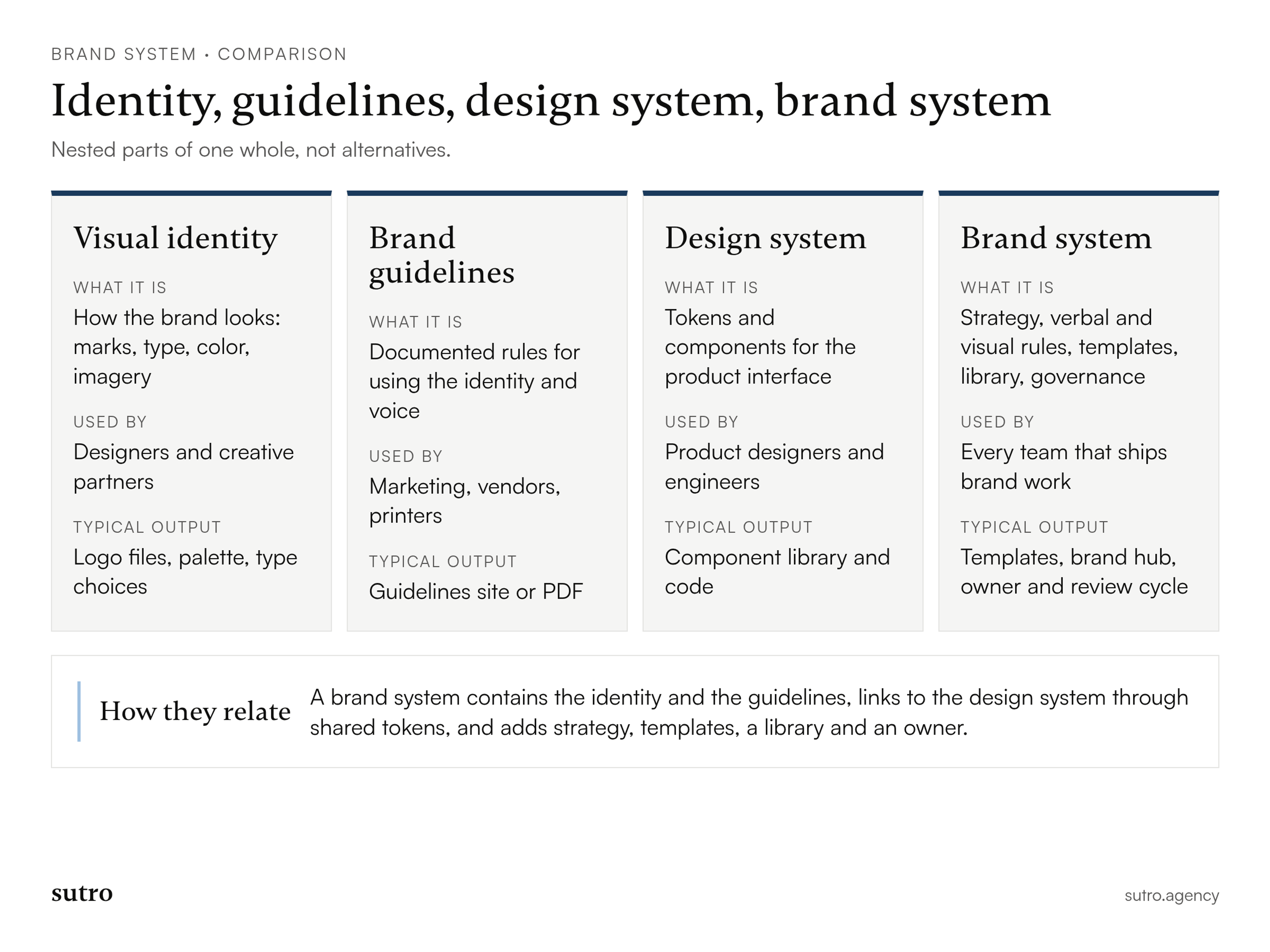
A visual identity is how the brand looks, brand guidelines are the documented rules for using it, a design system is the component library for the product interface, and a brand system contains all of them plus strategy, templates, the asset library and governance. They are nested parts of one whole, not alternatives.
Visual identity
The visual identity is the set of marks, type, color and imagery that make the company recognizable. It answers "what do we look like?" and nothing else. It says nothing about who the buyer is, what you claim, or who approves a new trade show banner.
Brand guidelines
Guidelines document the rules: clear space, color values, type hierarchy, voice examples, do and don't cases. They are necessary, and on their own they are usually a PDF that people open once. Guidelines tell a sales engineer what not to do; they do not hand them a deck that already works.
Design system
A product design system is the coded and designed component library for the software interface: tokens, components, interaction patterns, accessibility rules. IBM is a public example of the relationship. Its Carbon site describes Carbon as IBM's open-source design system, "shaped by the IBM Design Language", which is the brand-level layer above it (Carbon Design System). The design system serves product teams. The brand system has to serve everyone else too.
Brand system
The brand system is the umbrella. It includes the identity, the guidelines and a link to the product design system, and it adds what those three lack: the strategy core that justifies the choices, templates for recurring formats, a library people trust, and an owner. If you remember one distinction, make it this one: guidelines are a description, a system is an operating model.
Why growing B2B teams need a system
B2B teams need a brand system because consistency breaks at the point where more people produce brand work than the brand team can review. The issue is throughput, not taste.
Long sales cycles make this worse. A buying committee sees your website, a deck, a security one-pager, a webinar and a proposal over several months, often made by different people. If each piece looks and sounds like a different company, the buyer has to reconcile them, and that doubt lands on the vendor. A system makes the next asset correct by default instead of correct by review.
The moments that usually force the issue match the inflection points we work around at Sutro: moving upmarket, launching a product platform, raising capital, preparing for exit, or consolidating brands after an acquisition. In each, the volume of material goes up at the same time as the stakes.
How to build a brand system in six steps
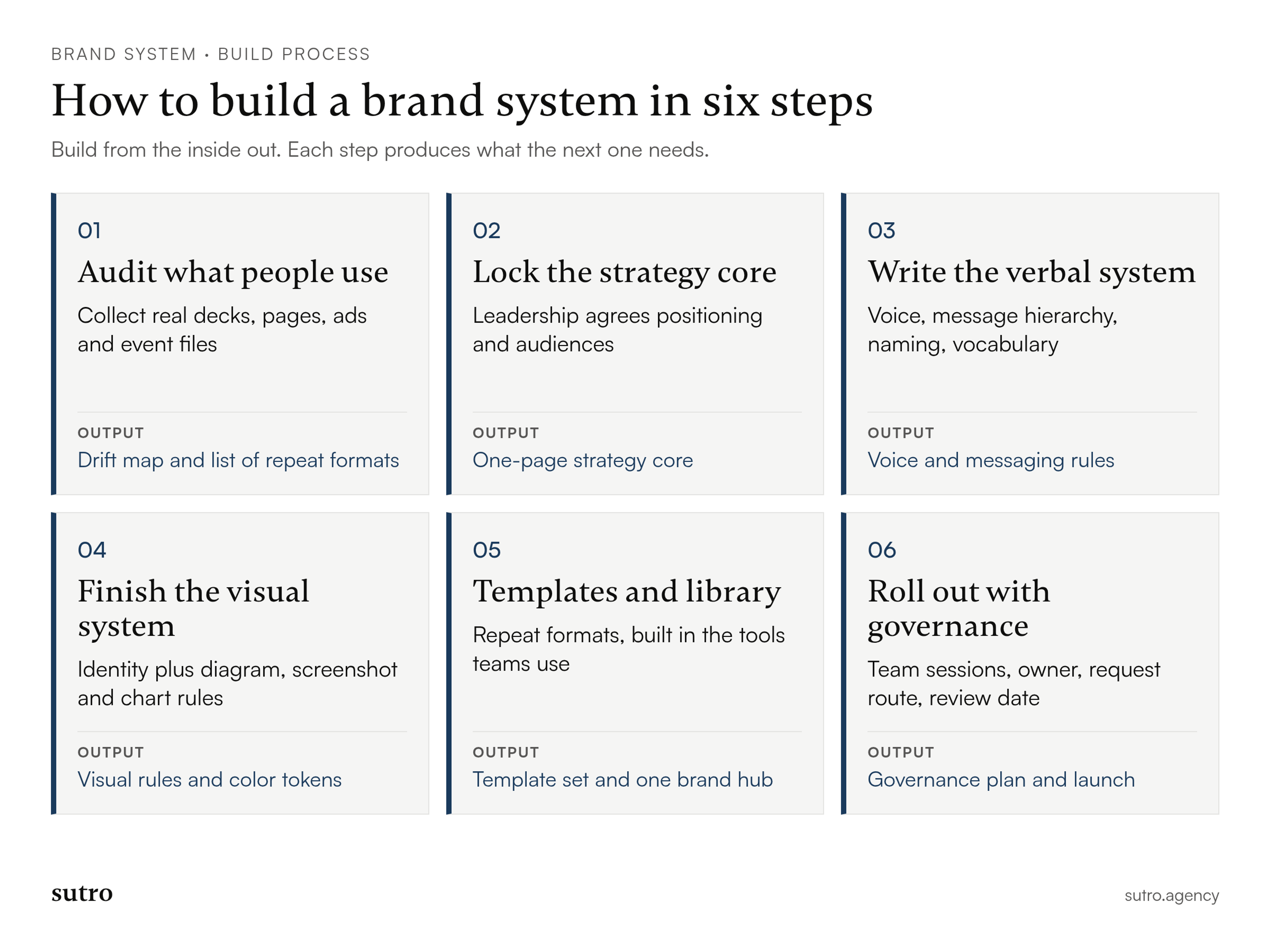
Build a brand system from the inside out: audit what exists, lock the strategy core, write the verbal system, finish the visual system, produce templates and the library, then roll out with governance. Each step produces a deliverable the next step depends on.
This sequence covers the system itself. If you want to see where it fits inside a larger engagement, I described how a full brand development project runs from research to launch in a separate guide.
1. Audit what people actually use
Start by collecting the assets people really ship, not the ones in the official folder: the last few sales decks, recent launch pages, event materials, partner one-pagers, ads and onboarding emails. Sort them by format and by who made them. The deliverable is a short map of where the brand drifts, which formats repeat most, and which teams make them. That map decides your template list in step 5.
2. Lock the strategy core
Agree on positioning, priority audiences and the company narrative before anyone opens a design tool. This is a leadership decision, not a design task. The deliverable is a one-page strategy core that every later rule can point to. If two executives describe the company differently, stop here until they don't.
3. Write the verbal system
Turn the strategy into voice principles, a message hierarchy by audience, naming rules and a short vocabulary list. Technical B2B usually needs two registers that sound like one company: precise language for engineers and outcome language for economic buyers. I keep the message hierarchy close to the sales talk track; my guide on building messaging pillars that hold up in sales calls covers that part in depth.
4. Finish the visual system
Complete the visual layer with application in mind. Beyond logo, type and color, technical companies need rules for architecture diagrams, product screenshots, data charts and code samples, because those are the visuals buyers actually study. Define color as named tokens with roles, not only swatches, so marketing and product can share them. The Design Tokens Community Group has released the first stable version (2025.10) of its token format, which exists to make that kind of exchange between tools reliable (Design Tokens Community Group).
5. Produce templates and the asset library
Build templates for the formats your audit showed repeat most, in the tools the people who use them already work in. For sales that usually means slides, not design software. PowerPoint's Slide Master is a good example of why: changes made to the master and layouts apply across every slide built on them, and people working in normal view can't accidentally delete or edit what was set there (Microsoft Support). Lock the structure, leave the content open. Then put everything in one library with clear names and one current version of each file.
6. Roll out with governance
Launch the system with short working sessions per team, not a company-wide announcement. Name the owner, publish how requests work, and set the review date before launch day. Without this step, the first five steps decay into another folder.
Worked example: a brand system for a fictional infrastructure company
Here is how the six layers fit together for one company. This is an illustrative example: Corvadine is a fictional B2B infrastructure software company, and none of the details below describe a real client.
Corvadine sells an observability platform to platform engineering teams and is moving upmarket to sell to the CIO's office. Its old brand was a logo, a color and a deck the founders made at seed stage.
- Strategy core: Corvadine positions itself as the system of record for production incidents, for teams that run critical services. Two audiences: the platform engineer who evaluates, and the IT executive who signs.
- Verbal system: engineer-facing copy names the mechanism ("traces, not samples"); executive copy names the outcome ("fewer escalations reach the CIO"). Banned words include anything that promises zero downtime.
- Visual system: a dark interface-led palette with one signal green reserved for healthy system states, a grotesk for headlines and a monospaced face for technical labels, plus fixed rules for how architecture diagrams are drawn.
- Rules and templates: a slide master for sales, a one-page security brief, a customer story layout, ad and event formats.
- Asset library: a single brand hub with downloadable logos, tokens, approved product screenshots and the current boilerplate.
- Governance: the head of brand owns the system; product marketing owns messaging; requests go through one channel; a scheduled review updates the library.
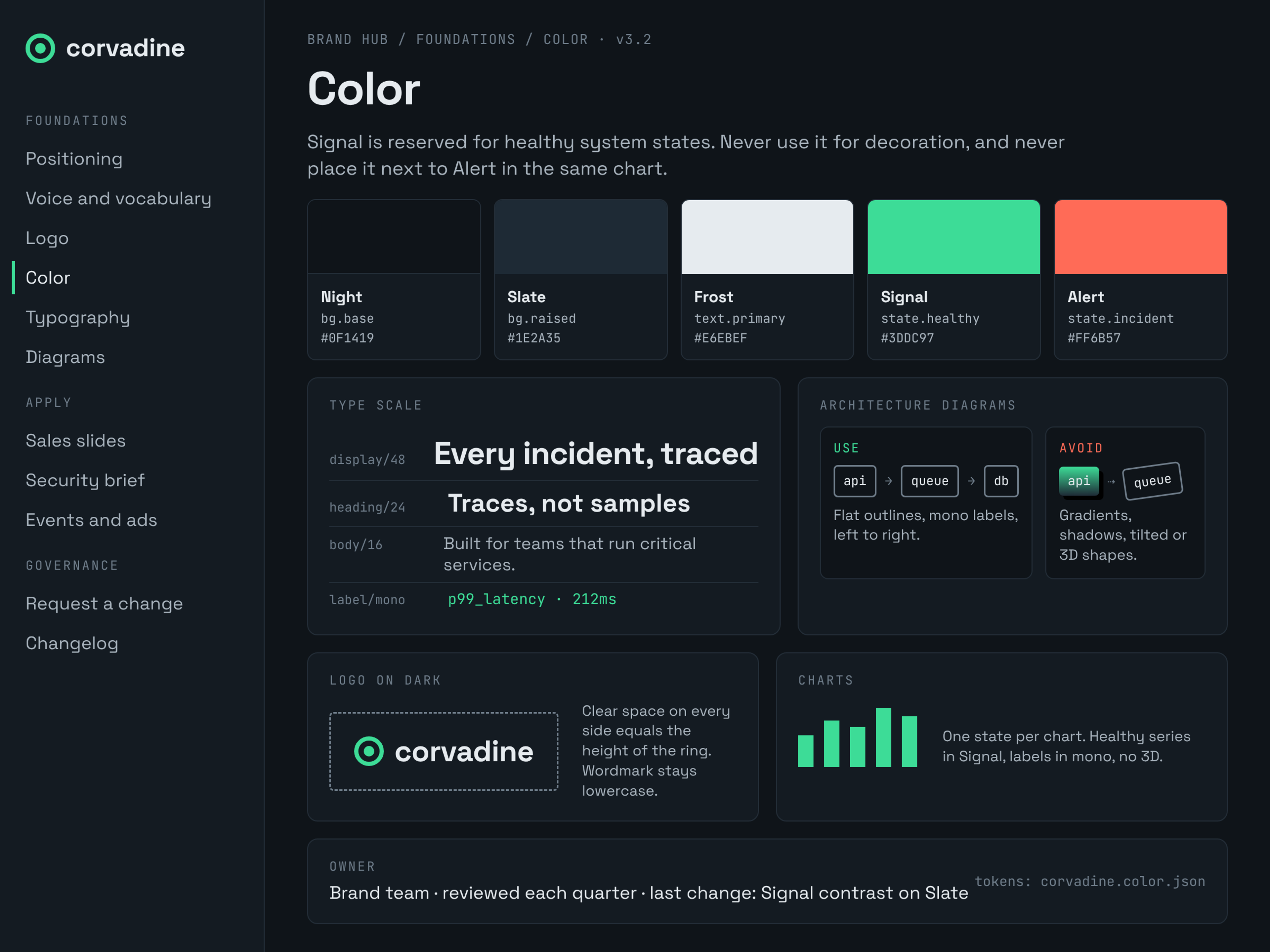
What makes this a system rather than a style guide is the connection between layers. The signal green exists because the strategy core is about reliability in production. The ban on "zero downtime" exists because the executive audience has heard it from every vendor and the engineering audience knows it is false.
Templates and the asset library: where scaling happens
Templates and the asset library are the layers that let a brand scale, because they turn rules into files people can use without a designer. If a team keeps rebuilding the same format from scratch, the system is missing a template.
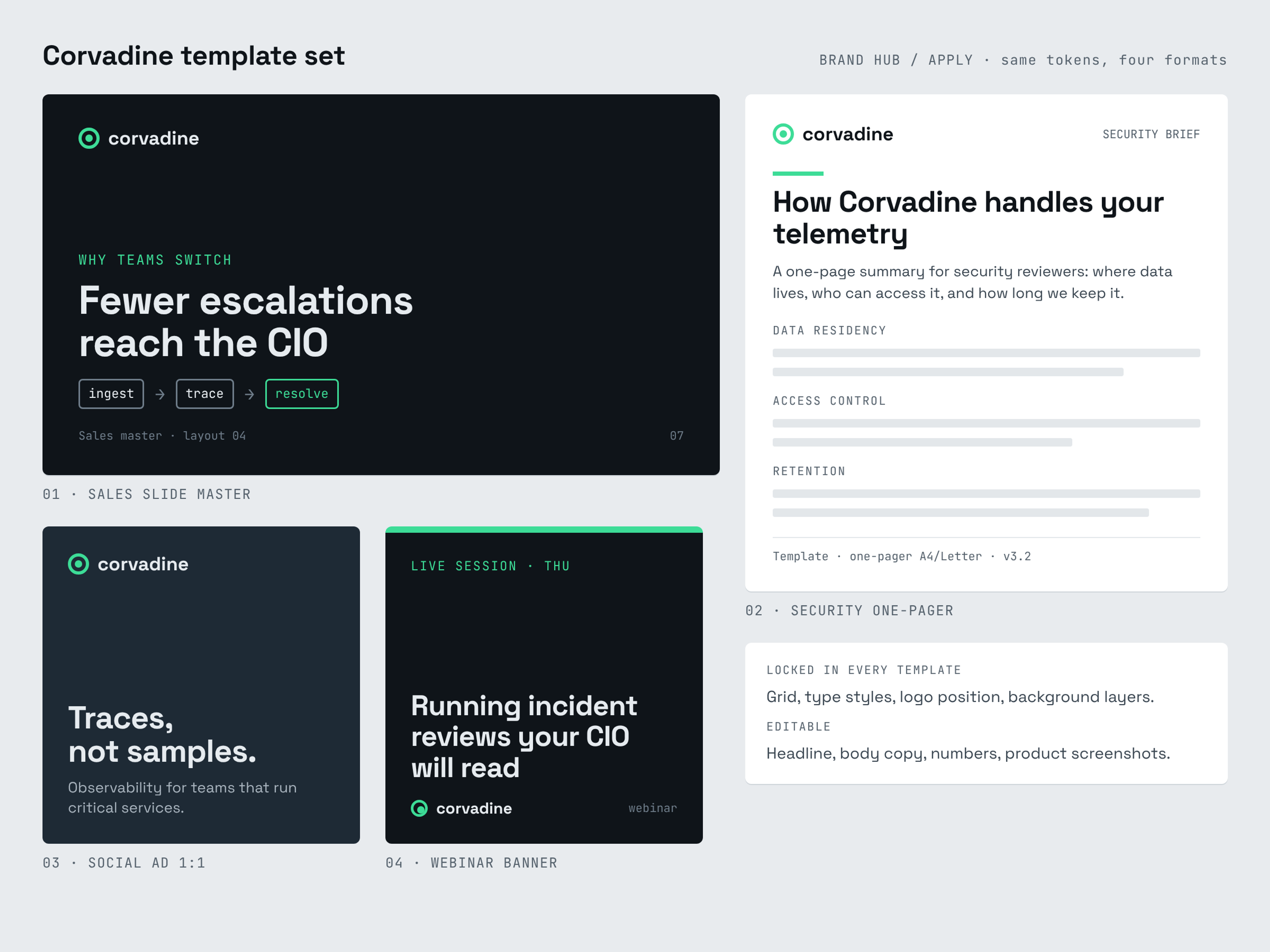
Three rules keep templates useful:
- Template the repeat, not the rare. Build for the formats your audit showed teams produce every week, and leave one-off flagship pieces to designers.
- Fix the frame, free the content. Lock grid, type styles, logo placement and background layers. Leave headlines, body copy, numbers and screenshots editable.
- Test with real content. Fill each template with the longest product name, an ugly table and a three-line headline before release. If it breaks, it is not done.
The asset library needs one property above all: people must trust that what they find is current. That means one location, one current version per file, retired files removed rather than archived next to live ones, and the approved boilerplate and product screenshots sitting next to the logos.
Governance: how to keep the system alive as you scale
Governance is the loop that keeps a brand system current: people serve themselves from the library and templates, a named owner reviews the exceptions, and feedback from those exceptions updates the system on a fixed schedule. Without it, a system starts to decay as soon as it launches.
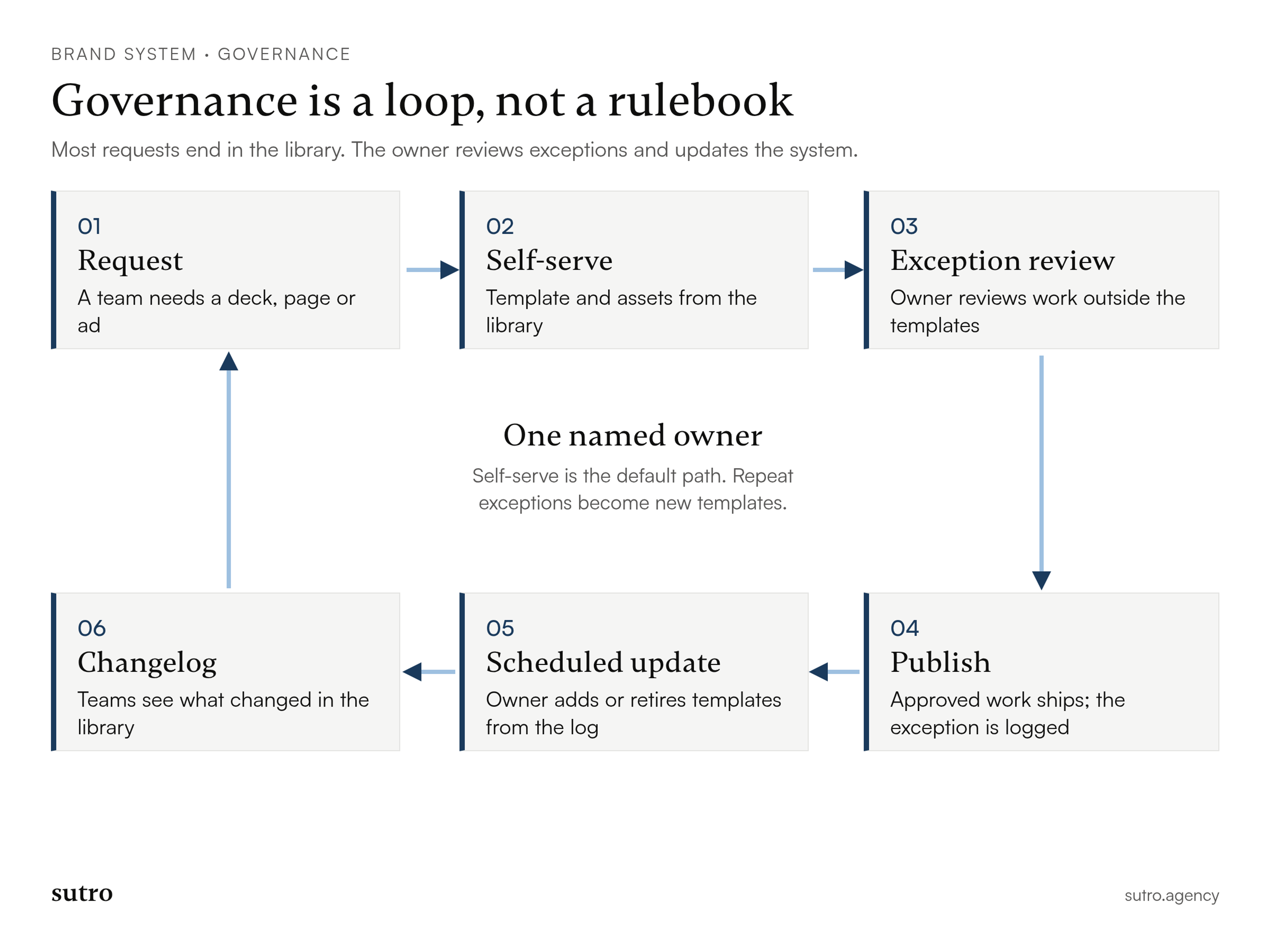
- One owner. A single person, usually the head of brand or a marketing leader, owns the system's health and version history. Shared ownership tends to mean nobody updates the library.
- Self-serve first. Most requests should end in the library. If the same request keeps reaching the brand team, that is a missing template, not a busy week.
- Review the exceptions. Work that falls outside the templates goes to the owner for review, and each exception is logged.
- Scheduled updates. Review the log on a fixed cadence, add or retire templates, and publish a short changelog so teams know what moved.
- Tiered access. Sales gets final templates and approved files; marketing and design get source files and tokens. Fewer people editing masters means fewer broken masters.
Most systems I have seen fail in one of three ways: they launched as a visual refresh with no strategy core, they policed every channel so hard that teams worked around them, or they were built for designers and ignored how sales actually assembles a deck. All three are governance problems that show up later as design problems.
A brand system readiness checklist
Use these questions before you commission or rebuild a system. Each "no" points to the layer that needs work first.
- Can two of your executives describe the company's positioning in the same words?
- Is there one message hierarchy that sales, marketing and product all use?
- Do your visual rules cover diagrams, product screenshots and charts, not only the logo?
- Do the formats teams produce most often have templates in the tools those teams use?
- Is there one library where every file is the current version?
- Is there one named owner for the system?
- Is there a published way to request something the templates don't cover?
- Is there a date on the calendar for the next system review?
If you answer "no" to the first two, start with strategy and messaging, not design. The visual work will be faster and cheaper once those are settled.
Conclusion
A brand system is how a B2B company keeps one recognizable voice and look while more people, products and regions start producing brand work. Build it from the inside out, starting with the strategy core, put most of the effort into templates and the library, and give it an owner and a review cycle from day one. If your team is approaching an inflection point and the brand is already fragmenting, book a call and tell us which formats keep drifting.
Questions
- What is a brand system?
- A brand system is the combination of brand strategy, verbal rules, visual rules, templates, a shared asset library and governance that lets many people create consistent brand work. Unlike static guidelines, it gives teams ready-to-use files and names who keeps them current.
- Can you give me an example of a brand system?
- IBM is a public example: its Carbon design system for products is described as shaped by the IBM Design Language, which sits at the brand level above it. For a smaller B2B company, an example is a strategy core, a message hierarchy, visual rules, a sales slide master and one-pagers, a single asset library and a named brand owner.
- What is the difference between a brand system and brand guidelines?
- Brand guidelines document the rules for using a brand. A brand system includes those guidelines and adds the strategy behind them, the templates that apply them, the library that stores them and the governance that keeps them current.
- Is a brand system the same as a design system?
- No. A design system is the component library for a software interface, used mainly by product designers and engineers. A brand system covers every touchpoint, including sales, marketing, events and recruiting, and usually shares tokens such as color and type with the design system.
- Who should own a brand system in a B2B company?
- One named person, usually the head of brand or a senior marketing leader, should own the system's health, versions and update schedule. Product marketing typically owns the messaging layer, and each team that uses templates should have a clear way to request changes.